 Prompt Cartography
Ready or not, here it is: The Prompt Cartography Map Design Lab is now live!
It's free. It's open. It's research-based. And it was built for anyone who has ever asked an AI assistant for a map and watched the answer return something "far less than stellar."
Ian Muehlenhaus, and his trusty LLM agents over at NLGIS.ai, preent you the Map Design Lab.
The laboratory gives prompt cartographers a faster, sharper way to direct their map designs. GIS professionals, enterprise data teams, civic innovation groups, tech companies, public agencies, journalists, educators, and independent mapmakers can now mix the reusable map design schemas I've been posting, inspect the visual DNA of your output, and manually fine-tune each style's influence weights into the Frankenstein map you want to create. You can then manually create new palettes and edit existing ones, add or remove fonts, and export a ready-to-use prompt map design style for your next prompt cartography project.
In plain language: this helps you get from "make me a map" to "make me this kind of map, with this visual logic, this history, this palette, this label behavior, this interface posture, and this design rationale, with a bit of my own random chaos-making thrown in for good measure."
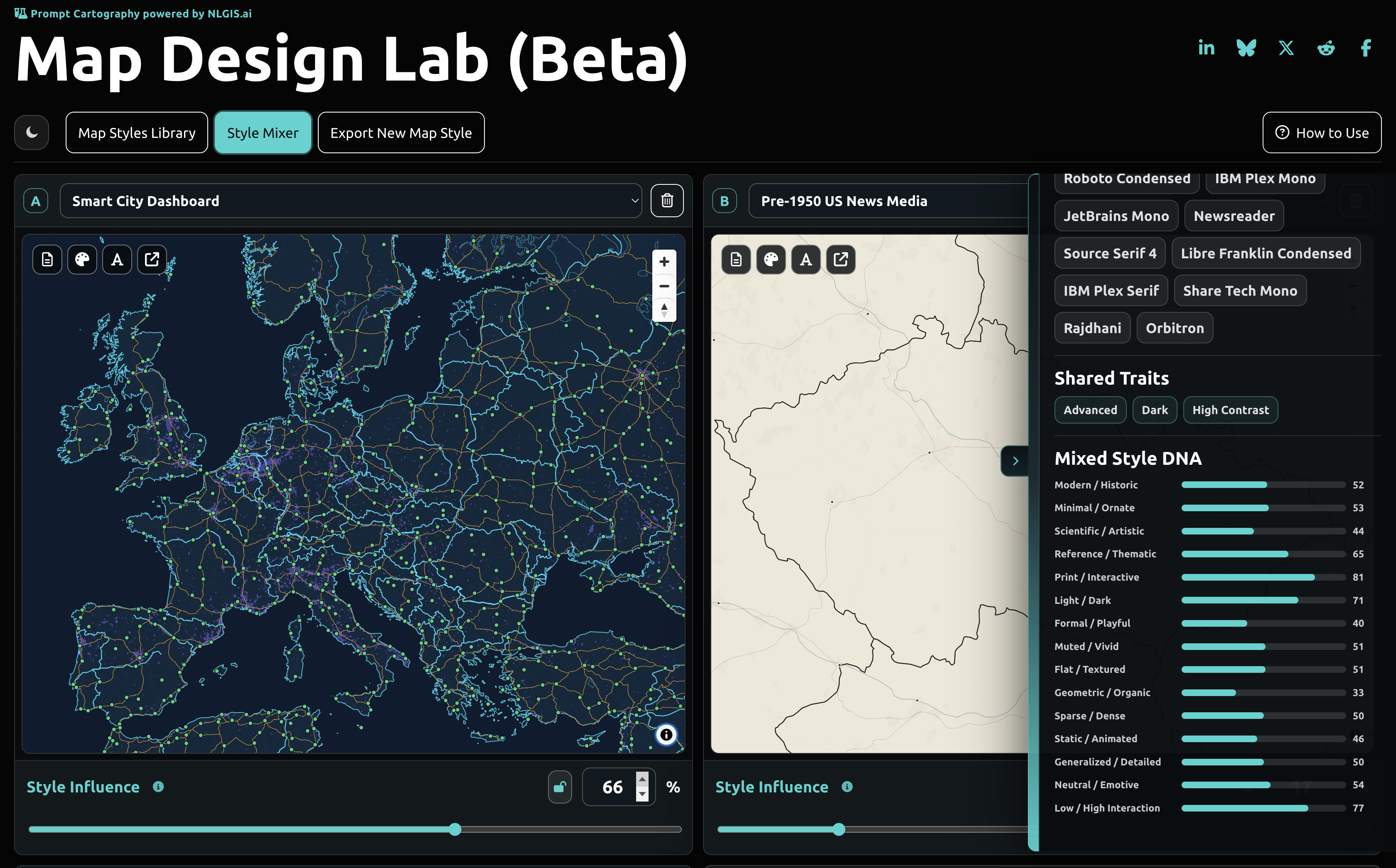
Map Design Lab is built on top of the Prompt Cartography Design Schema Library: reusable style systems for better AI-assisted map direction.
Why This Matters
AI can generate maps, map interfaces, data views, legends, annotations, dashboards, and web cartography faster than any previous production stack. But speed without direction is just accelerated blandness. And starting from scratch over and over is... tedious.
The bottleneck is no longer whether a model can produce code. The bottleneck is whether the human can communicate cartographic intent clearly enough for the model to act like a design collaborator instead of a default-map vending machine.
That is the problem Ian Muehlenhaus has been working on through PromptCartography.com (and the eponymous textbook): turning cartographic judgment into structured design artifacts that AI assistants can actually use.
The Map Design Lab is the next step in that work.
It gives teams a practical bridge between professional cartographic knowledge and modern prompt-driven production. It is useful for one-off experiments, but it is especially valuable for organizations that need repeatable map style direction across reports, applications, public dashboards, emergency communication products, research portals, field tools, policy maps, and internal decision systems. Design your maps stylistically and systematically
What You Can Do
The Map Design Lab lets you combine up to four map design schemas into a single style recipe. You can browse the style library, drop schemas into map slots, adjust each schema's influence percentage, lock ratios, remove or replace styles, and watch the mixed design direction update as you work.
You can inspect palettes, edit colors, add or remove typefaces, review visual traits, and compare style DNA dimensions such as information density, visual restraint, ornamental intensity, institutional authority, historical signal, emotional charge, and interface modernity.
You can open each schema in Markdown or JSON, copy it, download the original, edit it directly in the browser, download your modified version, or preview a demonstration map. When the mix is ready, export a final recipe in Markdown or JSON and bring it into your prompt cartography workflow.
That exported recipe is the good stuff. It gives your model a structured brief: mix ratios, source schemas, palette cues, typography cues, visual direction, requirements, and provenance language. It helps your assistant start from a richer design target instead of wandering through default map land until everyone runs out of patience.
Built for Map Design in the Real World
For GIS professionals, Map Design Lab can shorten the path from concept to first serious map draft. For large organizations, it can make visual standards easier to test, explain, and reuse. For technology companies building AI mapping products, it shows how style, provenance, prompt structure, and design reasoning can work together inside a modern mapmaking interface.
For government agencies, NGOs, and public-service teams, it offers a way to prototype maps that are not merely "pretty," but rhetorically appropriate: sober when the subject demands sobriety, legible when the audience is broad, restrained when trust matters, vivid when attention is the job, and historically literate when context carries meaning.
For educators, students, and researchers, it makes map style something students can inspect, edit, remix, critique, and cite. And that matters. A style is not just a look, an aesthetic. It is a bundle of decisions about hierarchy, evidence, audience, authority, culture, medium, and purpose.
This Week's New Styles
The Laboratory is already growing quickly. This week alone brought styles based on the United Nations' guidance for mapping sustainable development, retro Adobe Flash-era interactive maps, the past 26 years of UW-Madison Cartography Lab-inspired design influence, a prompt specifically designed for using D3 with equal-area projections, independent cartographer-inspired approaches, and three different World War II board game map styles. More are coming.
The range of motifs and inspiration is intentional. Prompt cartography needs institutional seriousness mixed with weird experimental energy. It also needs public-sector trust, newsroom clarity, academic rigor, software-native interface thinking, historical memory, and enough visual range to stop every AI-generated map from looking like it came from the same old open-source or proprietary chop shops.
More map design schema styles are being released weekly. This is only the beginning.
Free, Open, and Meant to Move
To celebrate the impending release of Prompt Cartography, Ian has decided to make the Map Design Lab free to everyone – no purchase necessary. Just curiosity and a willingness to blow maps up.
Access the tool at promptcartography.com/design-schemas/style-mashup-lab/.
No account. No paywall. No gatekeeping ritual. Open the Laboratory, choose your styles, mix them up, edit them, export your own unique style recipes, and use them in your own AI-assisted, prompt mapping workflows.
PromptCartography.com and NLGIS.ai worked together to bring you this release, and the tool carries the same basic bet behind Ian Muehlenhaus's broader prompt cartography work:
The future of cartography is not humans versus AI. It is humans getting much, much better at directing AI with judgment, structure, taste, evidence, and purpose. This will be done via the acquired skill of natural language prompting.
Ian Muehlenhaus built Map Design Lab for prompt cartographers who want to move faster without surrendering the craft. For traditional cartographers who want to jump right into prompt cartography.
Try it, break it, remix it, teach with it, learn from it, build with it, and stay tuned... The great Cartographic Reformation is just getting started.
You can quote Ian on that. ;-)